New launches, bought for you
The bot watches the Nearly launchpad and buys the next new coins that pass your rules: 1, 3, 5 or 10 of them, then it stops.
How the sniper worksSniper, trading bot and bridge. One chat.
The bot reads the Nearly launchpad every 6 seconds and buys the new coins you allow: your amount, your highest tax, your number of coins. It is a regular trading bot too: buy and sell any NEAR token that has a Rhea pool, and bridge your NEAR out to other chains.
The bot watches the Nearly launchpad and buys the next new coins that pass your rules: 1, 3, 5 or 10 of them, then it stops.
How the sniper worksPaste the address of any NEAR token that has a Rhea pool and tap an amount. Sell by share, set a limit, a take profit or a stop loss.
See it step by stepSend NEAR from your bot wallet to Ethereum, Solana, Base, Arbitrum, BNB Chain, Bitcoin or Tron, without leaving the chat.
Everything it doesAll of it runs inside one Telegram chat. Trades go through Rhea pools, on the route that pays the most.
Set the amount, the highest tax and 1, 3, 5 or 10 coins. The bot buys the next new Nearly coins on a NEAR pair, tells you each time, and switches itself off after the last one.
See how it worksSend a token address and the bot answers with price, market cap, liquidity, taxes and price impact.
Amounts and percentages on buttons you set yourself, or a custom amount.
Turn it on under Settings and set the amount. A pasted token address is then bought at once.
Name a wallet. When it buys a token on Rhea, your wallets buy it too. You set the amount, the wallets, the number of buys and the gain to sell at.
One tap sets a sell at a gain or at a loss, counted from the price you paid. You pick how much it sells.
Set a trigger price. The bot trades when the market reaches it.
Turn wallets on or off, then buy or sell across the ones that are on.
After a buy the bot pins a monitor with worth, payout and gain for each wallet.
One tap draws a card with your gain or loss on a token, made from your own trades in the bot, ready to share.
Import a wallet, paste the token, tap Track. Gain is counted from that moment.
A price chart inside the chat, drawn from pool data.
Send NEAR out as ETH, USDC, SOL, BNB, BTC or USDT to Ethereum, Base, Arbitrum, Solana, BNB Chain, Bitcoin or Tron.
Create wallets in the chat, name them, import your own, export the key at any time.
Gather the NEAR of your wallets into one, or spread it from one to the others.
Send a token to another account, or withdraw NEAR to any NEAR address.
Share your link. You earn 25% of the bot fee on every trade of the people you invite, paid in NEAR.
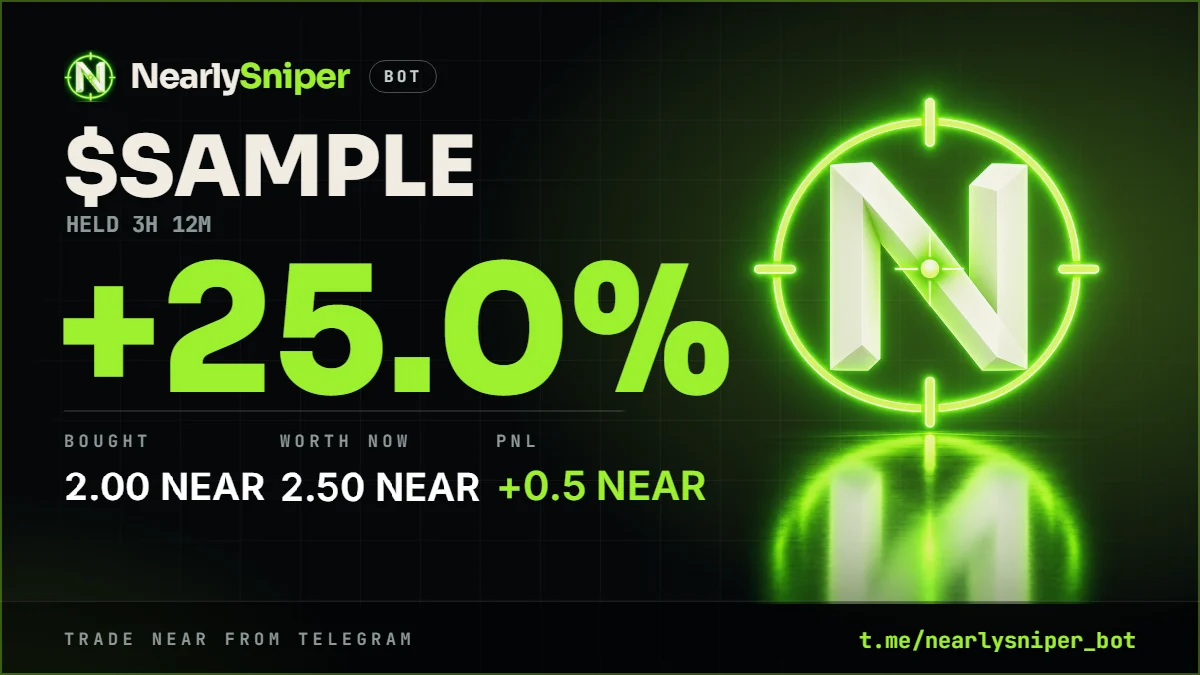
One tap on a token you hold and the bot draws this card: what you paid, what it is worth now, and the gain or the loss in between. A loss gets a card too.
This is a sample: the symbol and the numbers on it are made up. Your card is drawn from your own trades in the bot.
Nearly gets many new coins every hour. A sniper without an end empties a wallet, so this one has three settings and a limit.
Try them here: the sentence is the one the bot shows on its Sniper screen.
Live, from the launchpad's contract on NEAR. One dot for each coin of the last hour.
Nothing is set on this page. The sniper is turned on in the bot, under Sniper.
The bot reads the launchpad's contract every 6 seconds. A coin counts once its pool can be traded.
NEAR pairs only. Buy tax and sell tax at or under your limit. Coins older than five minutes are left alone.
With your amount and your slippage. The buy lands some seconds later, at the price of that moment.
The coin, its address, what you got, and Sell buttons. A buy that fails is told too, and counts.
The sniper switches itself off. Turn it on again when you want the next ones.
Eight steps, each with the bot's own screen. Tap a step to see what the bot shows.

$NSB launches on nearly.trade, the launchpad this bot is made for. Its contract address will stand here, and in the bar at the top of this page, first.
Symbols are not unique on Nearly: anybody can launch a coin called NSB. Trust the address on this page, never the name.
The fee is read from the running bot, so this page cannot name a fee the bot does not take.
No. It is an independent bot made for the coins of the Nearly launchpad. It reads the launchpad's public contract on NEAR and trades through Rhea, as the launchpad's own site does.
The bot looks for a new coin every 6 seconds and sends the buy as soon as it sees one that can be traded. The buy lands some seconds later, at the price of that moment. On a new coin that price can already be higher than the first one.
Because Nearly gets many new coins every hour, and the sniper buys the next ones that come, whatever they are. You choose 1, 3, 5 or 10 coins. Every try counts, also one that fails, so a wallet without NEAR is told once and not for ever.
No. It is a regular trading bot as well. You can buy and sell any NEAR token that has a Rhea pool, set limit orders, a take profit and a stop loss, copy a wallet, and bridge NEAR out to Ethereum, Solana, Base, Arbitrum, BNB Chain, Bitcoin or Tron. The sniper is one button in the same chat.
Every coin of Nearly, with its tax counted in, and any other NEAR token that has a Rhea pool. Paste the contract address, or the link to the coin on nearly.trade. A symbol that several coins use gives you a list, the most traded first: check the address.
On the bot's server, encrypted. That makes trading one tap, and it means the bot holds the wallet: keep only what you trade with. Wallets, Export key gives you the key whenever you want it.
When the price moves more than your slippage before the trade lands, the pool cancels it and your NEAR comes back. When the network is slow, the bot keeps checking and tells you how it ended.
Not yet. It launches on nearly.trade. When it is live, its contract address stands at the top of this page and in the section "$NSB". Until then, any coin called NSB is not the coin of this bot.
No. The sniper buys coins nobody has looked at yet, and most new coins go to zero. Use an amount you can lose. Nothing on this site is financial advice.
No signup. The wallet is created in the chat.